Architecture of the Multiplayer
This is the server used for the multiplayer in the overworld. It consists of a REST API and WebSocket support for real-time communication. The repository can be found here.
Purpose
Implementing multiplayer functionality in the overworld enhances engagement and social interaction by allowing players to see each other in real time. The system synchronizes the position and outfit of each player in the same course, encouraging exploration of the overworld and collaboration in minigames. By enabling users to identify and connect with others, Gamify-IT promotes engagement and sustained participation while maintaining performance efficiency.
Table of Contents
Architecture Design
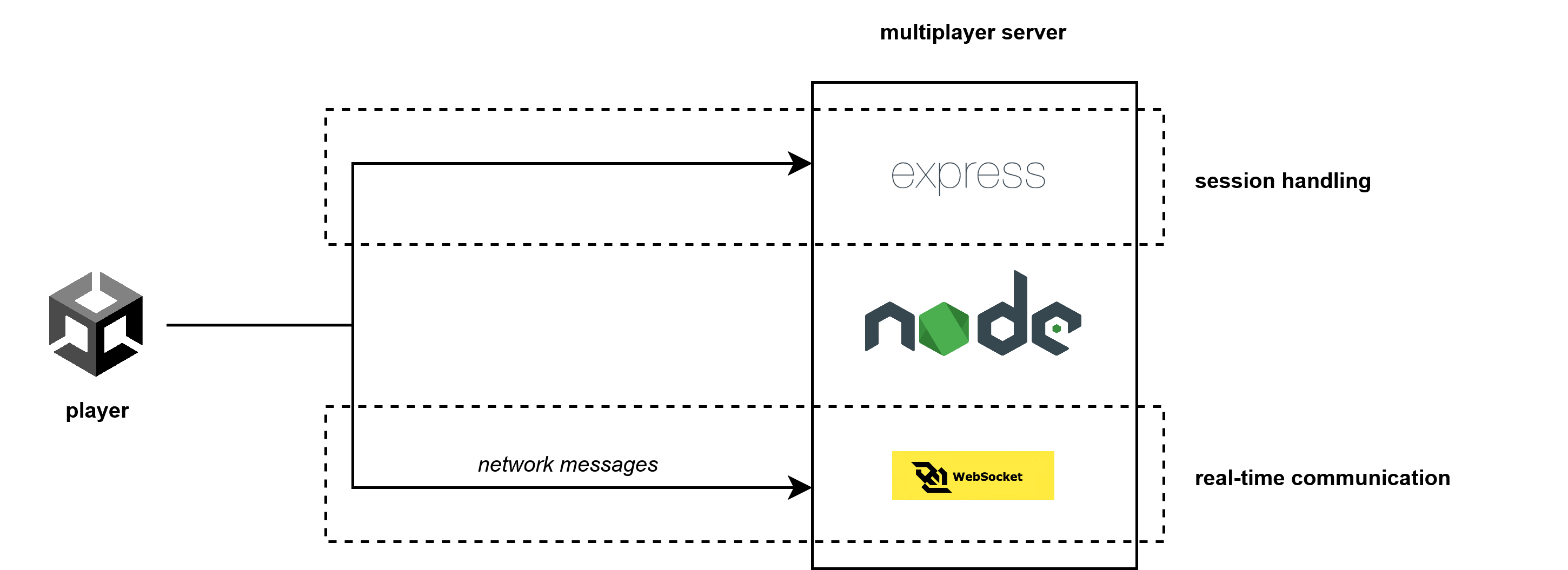
The overall architecture of the multiplayer is shown below.
Used Technologies
Client
The same technologies are used as in the overworld:
Unity and C#
WebGL (build)
Server
The server is built using Node.js and consists of a
REST API to manage session requests using Express.js
WebSocket for real-time communication using ws
Component Description
Here you can find a detailed description how each component is designed and works as well as where to find the code and and how to implement new features. It should be read carefully before changing the current code.
Server
The multiplayer server has its own repository. Its purpose is to handle client sessions as well as processing and broadcasting messages to players of the same course. That is, it consists of two parts, the WebSocket and the REST API.
General Structure
authentication: contains the JWT token authenticationclients: contains the b2b (backend-2-backend) communication methodscontrollers: contains the behavior behind a server routedata: contains the server’s data structuresroutes: contains the server routes definitionservices:utils: contains utility functions like the id generationwebsocket: contains the websocket functionality
REST API
The REST API currently accepts a POST request for establishing a new session and is accessible under api/v1/join/. For that, the user needs to send a ConnectionData object.
Note: To create a WebSocket connection, a client must register itself successfully via the REST API.
WebSocket
The WebSocket handles the message exchange between clients. It supports the following functionality:
client id retrieval
(dis)connection handling
timeout handling
course broadcasting
If a client does not send any messages for 50 seconds, its WebSocket connection will be closed (= timeout), but it can reconnect using the same client ID. However, if a client actively disconnects (e.g., by quitting multiplayer/overworld or closing the browser), it will be removed permanently with no option to reconnect.
Client
The code for the multiplayer can be found in the multiplayer folder of the overworld repository.
A client is a player and can start a new multiplayer session by sending a post request to the server.
As a response, the client receives a unique session id and opens a WebSocket connection to send messages
in order to synchronize position and outfit.
Main Scripts
MultiplayerManager.cs
The MultiplayerManager.cs script manages all client-side multiplayer content.
It consists of six regions:
websocket connectionto establish and manage the WebSocket connectiontime-based routineslike checking inactivitymessage sendingfor serializing and sending different types of messagesmessage processingfor deserializing messages and process their contentmultiplayer session handlinglike pausing, resuming or quitting a sessionremote player handlingto update the physics and appearance of other (remote) players
EventManager.cs
The EventManager.cs defines a generic event which is used for an event-driven communication. Each section in the code that requires data-synchronizing uses the trigger event to send a network message of a certain type.
User Interface
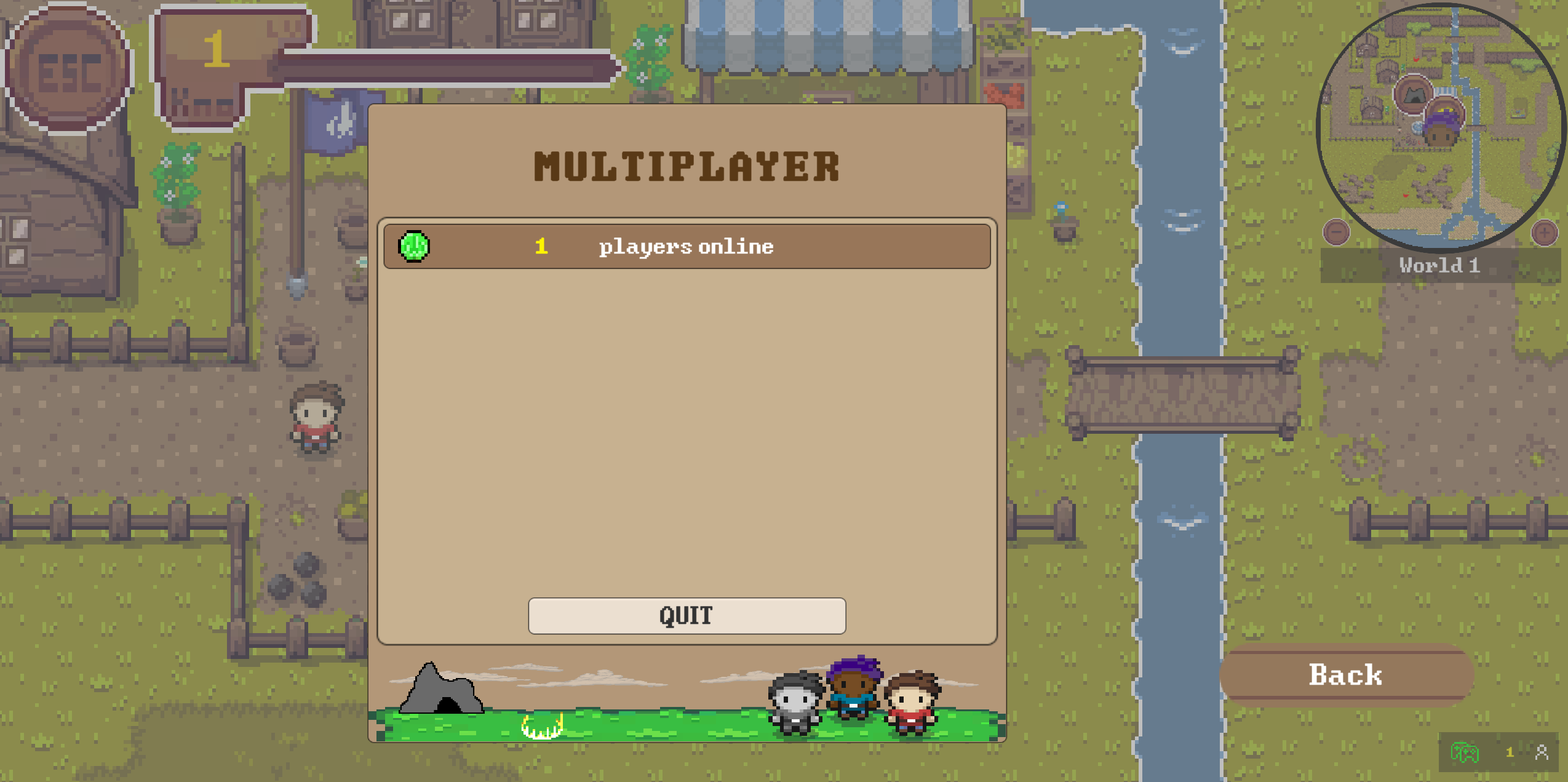
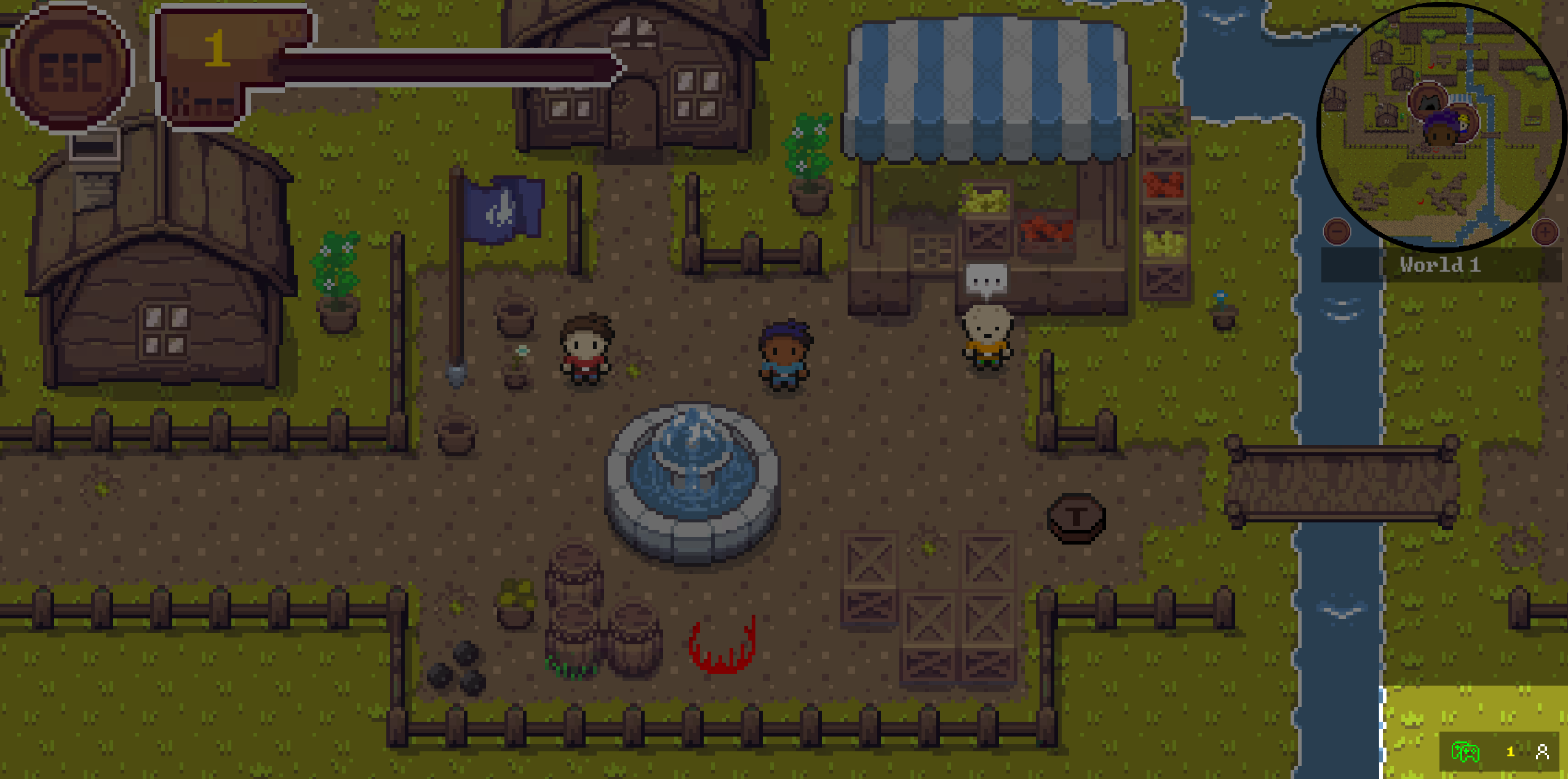
There are two multiplayer-related UI elements in the overworld:
Multiplayer Menuin the pause menu to start and quits sessions, provides a detailed overviewMultiplayer HUDin the bottom left corner shows the connection state
Their logic is handled in the MultiplayerMenu and MultiplayerHUD script.
Network Messages
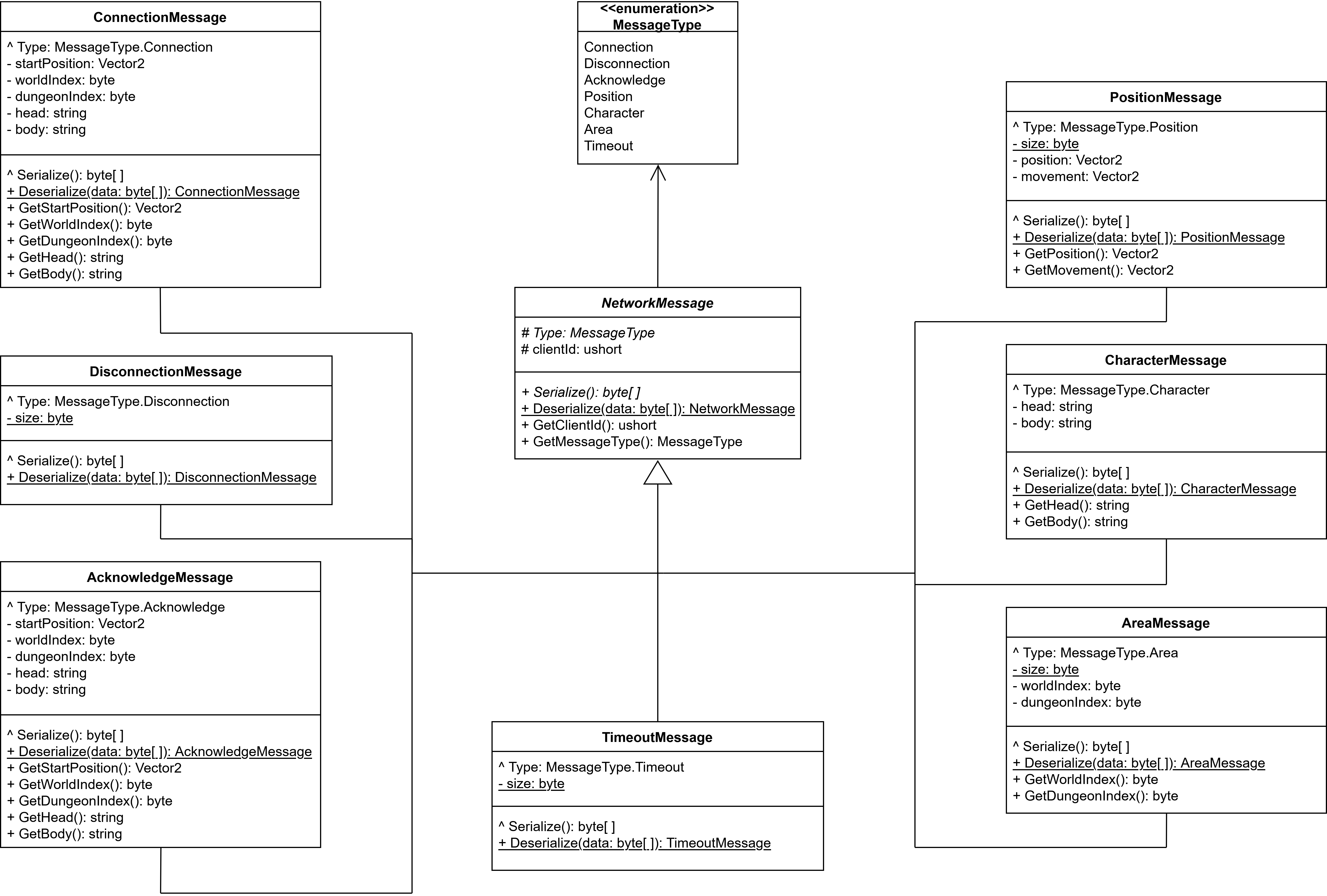
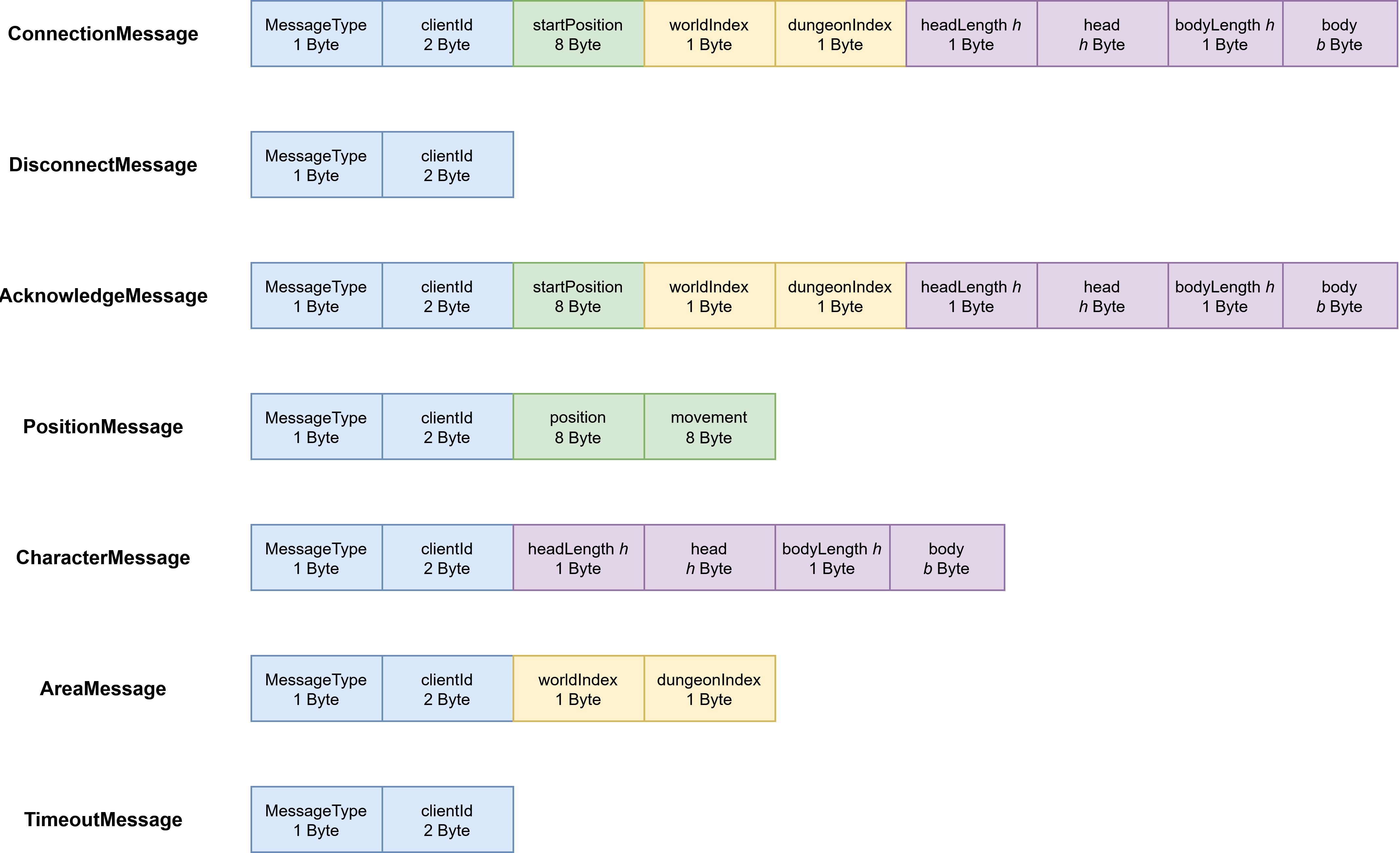
The data sent via the WebSocket is called network messages. Their overall structure is defined
in the abstract NetworkMessage class and is further extended by the children classes in order to consider specific behavior.
Currently, the multiplayer supports sending network messages of seven different types.
Below, you can find a detailed overview how the messages are defined.
Note: After 50 seconds of inactivity, i.e., no messages are sent, the player’s connection is timed out with the possibility to reconnect. However, if the player quits the game or manually terminates the multiplayer, there will be no reconnection possible.
Class Diagram
Protocol Data Unit (PDU)
Typical Message Exchange Sequence
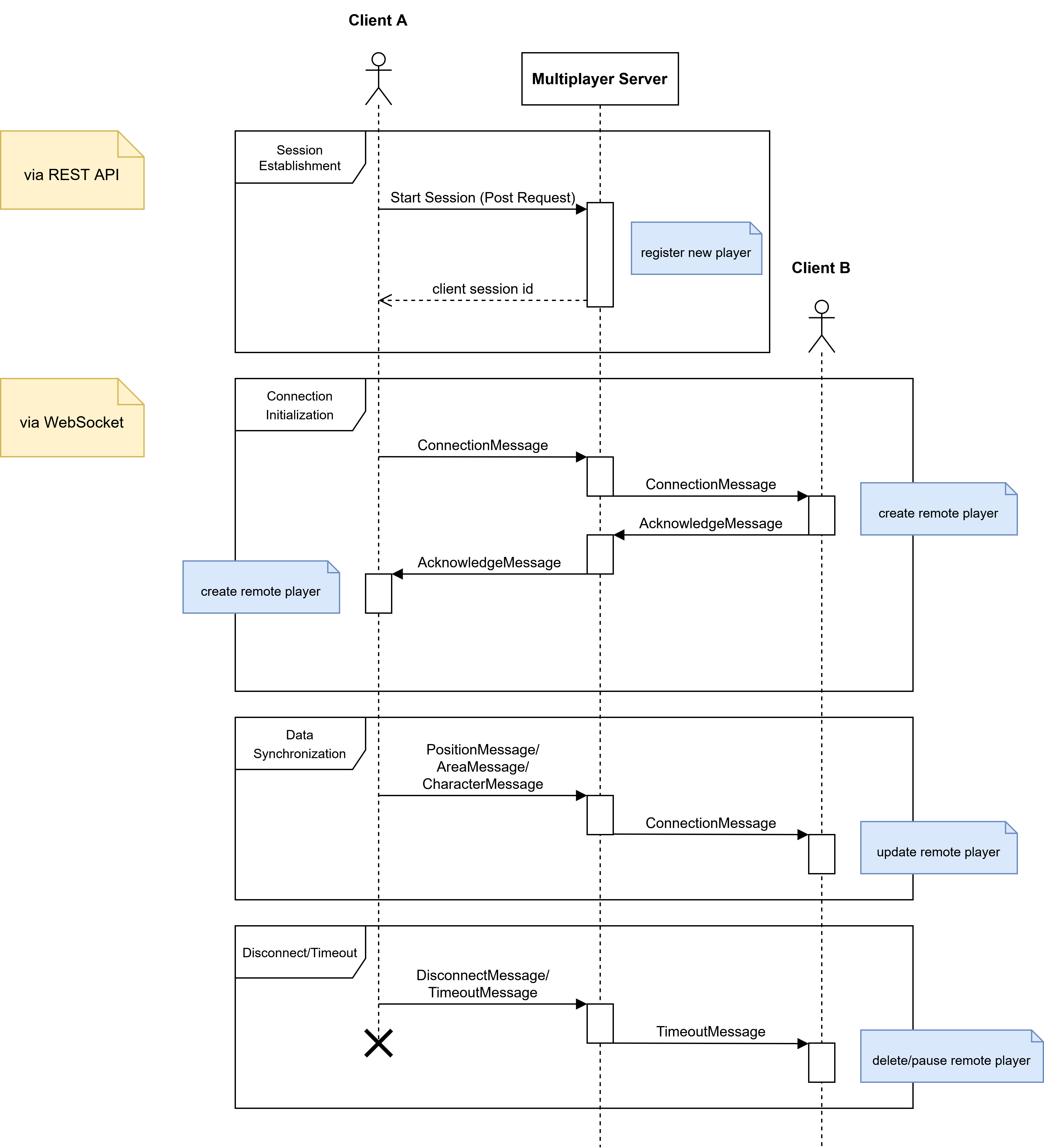
Connection and disconnection to the server requires sending a specific combination of messages.
The sequence diagram below illustrates a typical message exchange between two clients connected
with the multiplayer. Note that in this case, player B has already established a successful connection.
Development
Getting Started
Install Unity Version 2021.3.2f1 (LTS).
Overworld
Clone the repository
git clone https://github.com/Gamify-IT/overworld.git
multiplayer-backend
Clone the repository
git clone https://github.com/Gamify-IT/multiplayer-backend.git
Install the dependencies
npm install
Build and Run
Build the unity project like described in this manual.
To run the multiplayer server locally with IDE features and all necessary dependencies, start the dependencies via docker:
docker compose -f docker-compose-dev.yaml up
Then start the frontend with:
npm run dev
You can now access the game at localhost.
Tests
There are a few tests to check system performance and feature accuracy.
Unique ID generation
The generation of new client session ids is tested for:
uniqueness
reuse after release
error for releasing invalid id
error for unavailable ids
Known Design Flaws
No updating of remote players if player is in pause menu (since time and hence physics is paused)
Outfit is sent as two strings (body, head), better would be an efficient byte coding, allowing unique outfit determination and reconstruction
Lobbys might improve user experience and network traffic